 Nova
NovaEvery profile is its own browser
Cookies, storage, cache, extensions and settings stay inside one profile. Each running profile even gets its own Dock icon with its name on it.
Antidetect browser for affiliates & media buyers
Give every account its own browser profile, cookies, fingerprint and proxy. Create profiles in bulk, prepare them with Cookie Robot, and share access with your team.
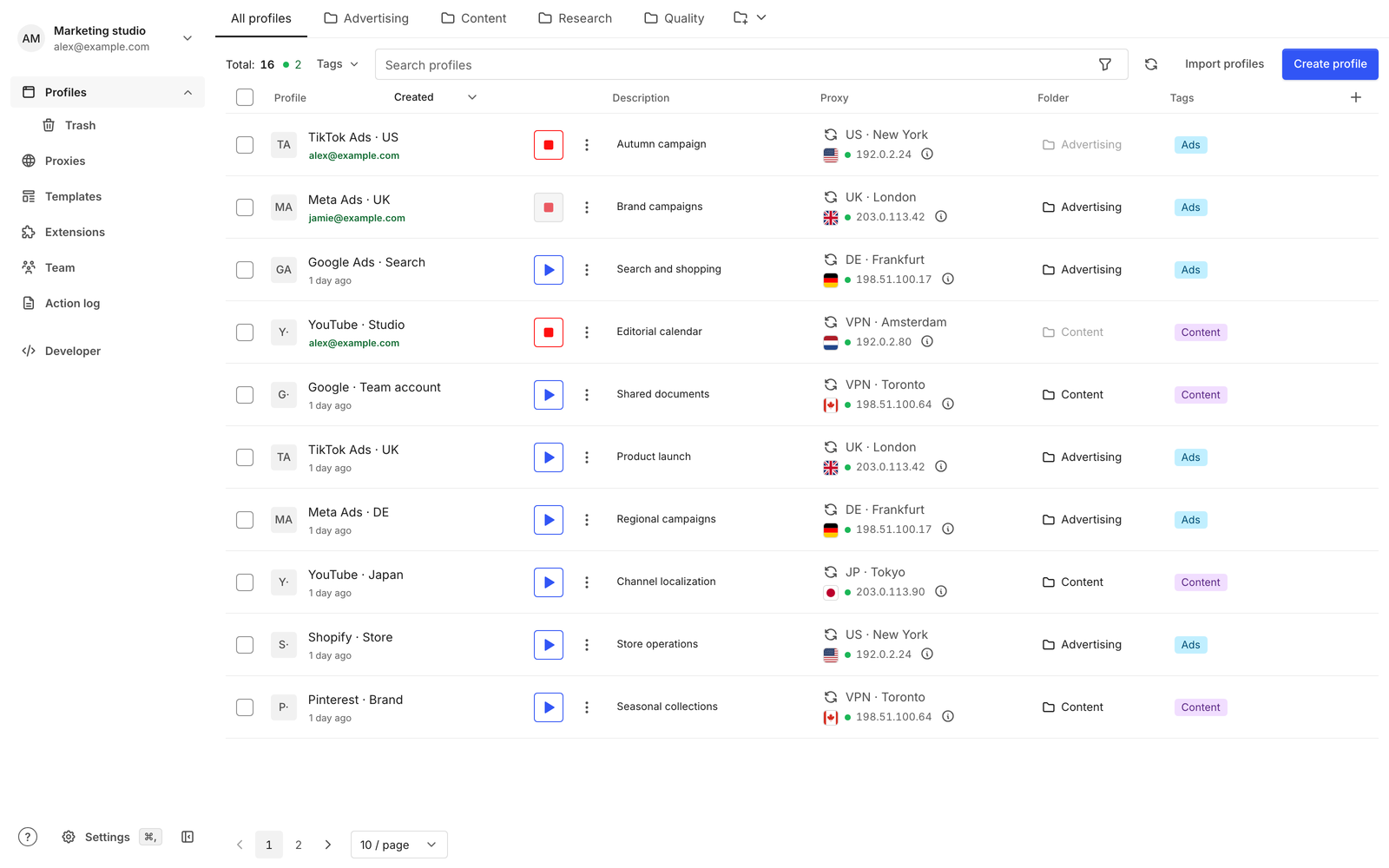
Everything in one app
Cookies, storage, cache, extensions and settings stay inside one profile. Each running profile even gets its own Dock icon with its name on it.
Add HTTP, SOCKS and SSH proxies, or import WireGuard and AmneziaWG configurations. Check the connection before launch.
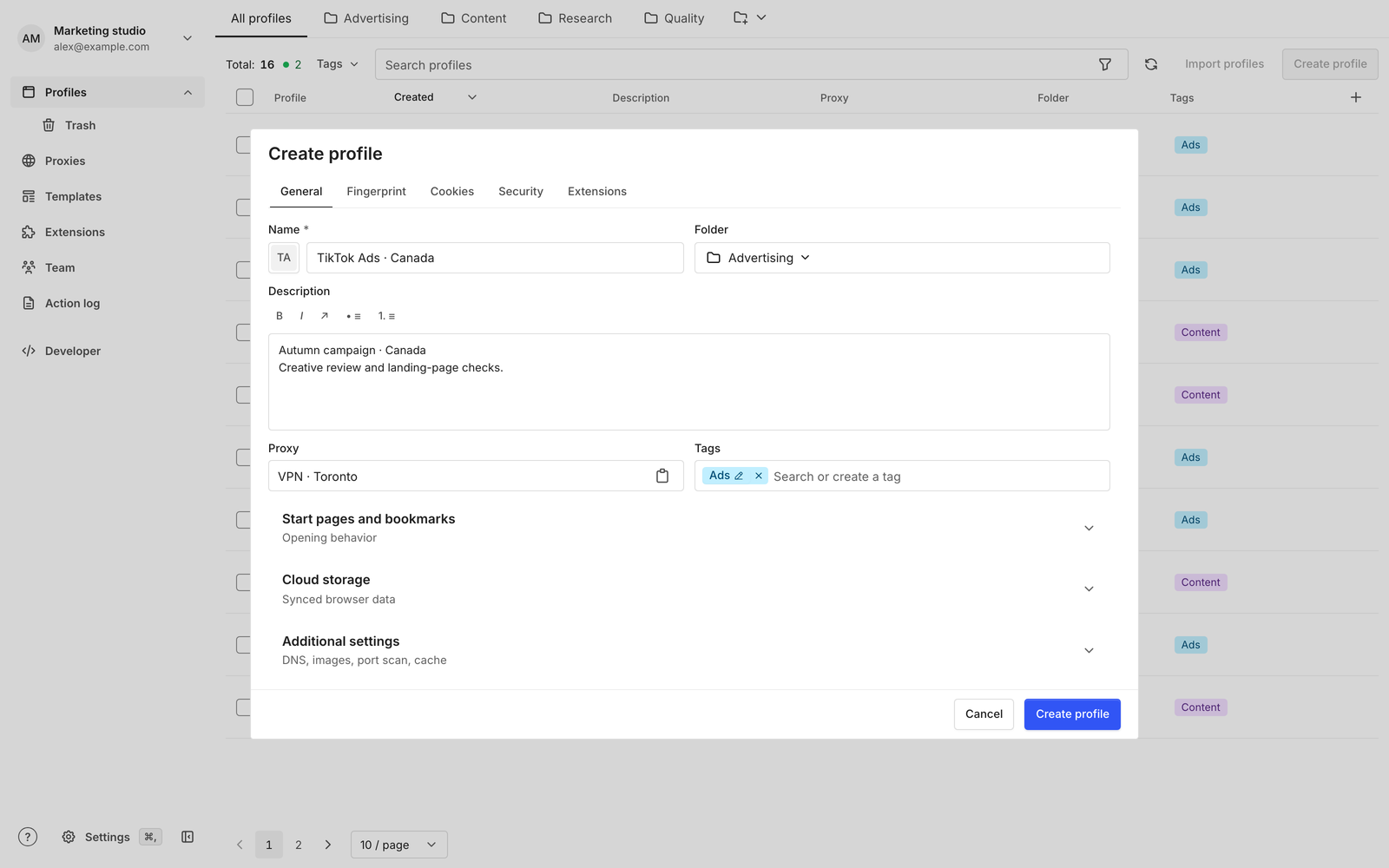
Language, time zone and geolocation can follow the proxy location, or set them yourself. Pick the user agent and fonts per profile.
Invite teammates by email, give each a role and the folders they need. A profile in use stays locked to the person working in it.
Save a version before a risky change and restore it when something breaks. Deleted profiles wait in Trash.
Cookie Robot visits the sites you list, then saves a verified snapshot, so a fresh profile has a browsing history before you sign in.
Save a setup as a template and apply it in bulk. Import up to 100 profiles at a time from a CSV file.
Automate with the TypeScript SDK, live change streams and signed webhooks. Scope each script’s access to its task.
A calmer way to manage accounts
Spend less time finding the right session and more time doing the work you opened it for.
Create a browser profile with its own cookies, saved state, and settings. Use templates to keep repeated setup consistent.
Bring your existing proxies, organize your inventory, and assign the connection each profile needs.
Invite teammates to your workspace and control their access. Follow activity and hand profiles over without passing session files around.
Reopen a saved session and continue your work. Profile versions and recovery tools help you handle a change that goes wrong.
Security
The things that unlock your accounts never end up where they do not belong.
Raw cookies, passwords, proxy credentials, two-factor secrets and keys stay out of logs and telemetry.
Every launch and every change is authorized against current membership and role. A hidden button is never the lock.
Protect each Isoline account with an authenticator app and recovery codes, and review where you are signed in.
Pages run in Chromium, apart from the Isoline manager, so web content never gets the manager's access.
See who launched, changed, moved or transferred a profile, and export the history when you need it.
Isoline builds its own Chromium with a small patch set and a dedicated update process for upstream security fixes.
Make the right move
Compare Isoline with the browsers on your shortlist. Get specific about profile management, teamwork, proxies, and the way your team operates.
Use cases
Campaign accounts, trackers and proxies organized around each offer.
Client ad accounts and social channels, each in its own profile, with clear owners.
Brand and creator accounts in one inventory that the whole team can follow.
Storefronts and marketplace seller accounts kept apart, profile by profile.
Permitted data collection with repeatable profiles, proxies and API access.
Test regions and languages with consistent browser and proxy settings.
Better systems for growing teams
Build your account inventory, organize campaign work, and make the next team handoff easier.
agency operations
A practical operating model for agencies adding clients and operators: define access, organize work, standardize handoffs and measure the mistakes that slow delivery.
UGC workflows
Keep creator identities, brand access and publishing responsibilities clear with one operational inventory, separate rights records and a repeatable account handoff.
team handoff
A reliable handoff connects the right account, completed browser work, current access and a short task record. Use this checklist for shifts, contractors and client transitions.
browser rankings
An Isoline-published ranking for agencies that prioritize organized client work and team handoffs, with vendor sources, practical tradeoffs and a reusable trial method.
Still have a question? Write to the team
An antidetect browser manages separate browser profiles with their own session data and configurable browser settings. Isoline combines those profiles with proxy management and shared team workspaces.
Agencies managing client campaigns, social media teams, and creator teams organizing accounts they own or are authorized to manage. It also supports browser testing and other permitted multi-profile work.
Yes. Bring your own proxies, manage them in Isoline, and assign them to profiles. A browser profile and its network connection are separate parts of your setup.
Invite people to a shared workspace and assign the access their role needs. Profiles run on each person's computer, while workspace access and synchronized profile data are managed through your account.
No. Isoline's interface language is separate from a profile's browser language, time zone, and region settings. You can work in your preferred language without changing the profile setup.
Isoline is built for Macs with Apple silicon and uses a Chromium-based browser. Browser profiles run locally on your computer.